Joppa Products · 01 · live in production

Zora

The AI back-office for event professionals.

Zora reads your inbox, drafts replies in your voice, runs your calendar, sends your invoices, and gives every client a branded portal: one system where there used to be five. You stay in control; Zora does the busywork.

zora · live
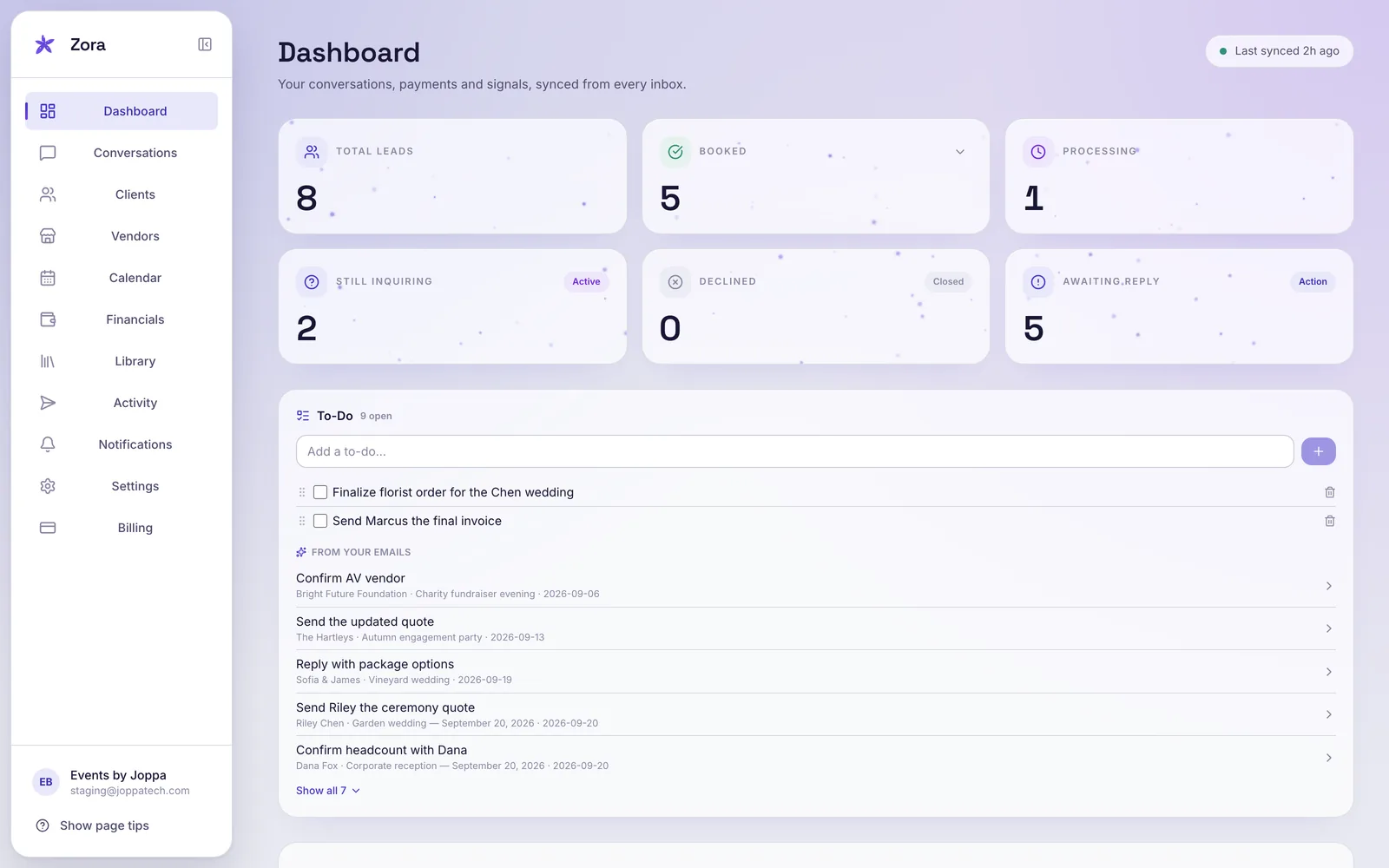
The Zora dashboard: lead funnel, bookings, and a to-do list drawn from your email
Why Zora exists

You started this business to make events. Not to spend Sunday night answering email.

Every late reply is a booking that books elsewhere. Every invoice you chase is an evening gone. Zora runs that side of the business, quietly, all day, so the only work left is the work you actually chose.

What Zora runs for you

Five jobs. One quiet system.

Pick a job to see how Zora handles it.

Every inquiry, read and sorted.

Zora reads your email the moment it lands and organizes each conversation by where it actually is: new lead, in progress, booked, completed. Nothing gets lost three pages down your inbox.

  • Auto-classified by status, updated as threads move
  • "Needs response" surfaced first, so nothing goes cold
  • Junk filtered out before you ever see it

Replies in your voice, ready before you sit down.

Zora learns your packages, your prices, and the way you write, then drafts every reply from that memory. A verification pass checks each claim against your real data, so a quote is never made up. You read, tweak if you like, and send.

  • Three tones, or your own instruction
  • Pricing pulled from your catalog, and fact-checked
  • Nothing goes out without your approval

Every dollar, from inquiry to take-home.

Deposits and balances go out on schedule and get paid online. Log expenses, bill add-ons, and pay each person on your team their own rate. Zora can even send each vendor a private pay packet: their date, their venue, their pay, and nothing else.

  • Clients pay online; status updates the moment they do
  • True take-home per event, computed for you
  • Vendors see their pay, never your totals

A calendar that thinks.

Zora knows when you're free. It answers "are you available?" inside a draft, creates the event automatically the moment a booking is confirmed, and warns you before you ever double-book.

  • Real-time availability from your Google Calendar
  • Events auto-created on booking, nothing to re-enter
  • Conflict alerts before they become problems

A polished home for every client.

Each client gets a private, branded link: checklist, file uploads, invoices, and a timeline of where things stand. Intake forms collect every event detail for you, and Zora remembers each client's preferences across every thread.

  • Your colors and brand, not ours
  • Shared checklist and document uploads in one place
  • Intake forms that fill the details in for you
Built to be trusted

Nothing reaches a client without your click.

24/7
your inbox, watched
0
emails sent without your approval
1
clear number for every event's money

Zora drafts, sorts, tracks, and reminds. Sending is always yours. Your data is never sold and never used to train outside models, and you can disconnect Google access at any time.

The quiet depth

The parts you find in week two.

The features nobody puts in a headline, and nobody gives back once they have them.

Library

Your files, two clicks from any reply

Packets, contracts, lookbooks, and menus live in one place, and attach to any conversation without hunting through your downloads folder.

Activity

Nothing invisible

A running log of everything Zora sends or creates for you, so there are never surprises.

Insights

A morning read

Who is waiting, what went quiet, what needs you today. Thirty seconds with coffee.

Intake

Forms that chase the details

One link collects the date, venue, guest count, and wishes, straight into the conversation.

Vendors

Vendors, kept apart

Florists, DJs, and rentals live separately from clients, each with their own pay tracked.

Memory

It remembers, client by client

Preferences, history, packages discussed, and the promises you made: recalled on every thread, and sharper the longer Zora runs.

Deep scan

Bring the past with you

Point Zora backwards and it pulls in months of old inquiries, organized like they arrived today.

Getting started

Running in a day.

1

Say hello

Request a demo. A real person answers, usually the founder.

2

Concierge setup

We connect your Gmail and calendar with you, and teach Zora your packages, prices, and voice.

3

Zora gets to work

By the next morning your inbox is sorted, drafts are waiting, and the money side is tracking itself.

Pricing

One plan. Everything included.

Zora · founding plan
$249 / month

Flat. Every feature, end to end. No add-ons, no per-seat games.

  • AI inbox, drafting & the verification pass
  • Calendar sync, availability & auto-events
  • Invoicing, online payments & automation
  • Branded client portal & intake forms
  • White-glove, done-with-you onboarding
Request a demo

Onboarding U.S. event professionals by invitation

FAQ

Questions, answered.

How does onboarding work?
It's done with you, not dumped on you. We set Zora up with your packages, pricing, calendar, and the way you write, then you review everything before it goes live. Most planners are up and running within a few days.
What can Zora send on its own?
Nothing that matters without your say-so. Zora drafts your replies and invoices and preps your calendar events, but every client-facing send waits for your approval. You stay in control; it handles the busywork.
Is my inbox and client data safe?
Yes. Zora only touches the Gmail and Calendar data the features you turn on actually need. We never sell your data, and your emails are never used to train AI models. You can disconnect Google access anytime. Full detail is in our Privacy Policy.
What tools does Zora replace?
For most event pros, Zora stands in for a CRM, a scheduler, an invoicing tool, and a big chunk of manual inbox work. One flat plan instead of a stack of subscriptions.
What does it cost, and can I cancel?
$249 a month, flat, with every feature included. No per-seat pricing, no add-ons. Start with a 10-day free trial, no card required. Cancel anytime; your access runs through the end of your billing period.
Do I need to be technical?
Not at all. If you can use Gmail and Google Calendar, you can use Zora. Onboarding is white-glove, and support is a real person, not a bot.
Get started

See Zora run your workflow.